
Locations:
- Student "Name": View Withdrawal Worksheet page
- Student "Name": Edit Withdrawal Worksheet page
- Program "Name" page
Users with the following permissions:
- Leads/Students: View Withdrawal Worksheet
- Leads/Students: Edit Withdrawal Worksheet
- Programs: Edit
Case:
The withdrawal worksheet document does not show the student’s days attended in the group. They have to be calculated and entered manually and this takes extra time.
Problem:
How to simplify the process of student’s attended days calculation?
Solution:
The Program "Name" page now has the Show Days Attended in the Program in Withdrawal Worksheet setting at the Education subpanel:

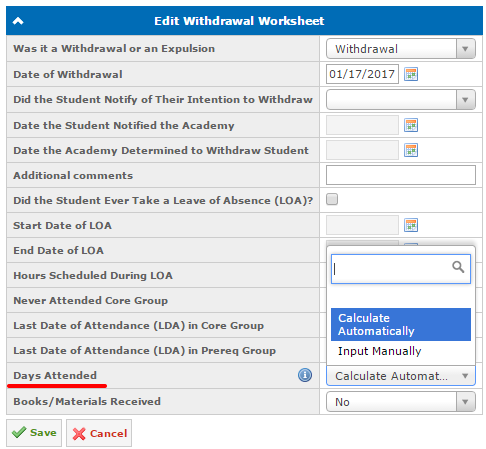
If this setting is enabled, the Days Attended field will be shown at the Student "Name": View Withdrawal Worksheet and the Student "Name”: Edit Withdrawal Worksheet pages as well as in the PDF version of the document.
The following Days Attended field value input variants are available:
- Calculate Automatically (selected by default) - the value is calculated automatically as the difference between the Last Date of Attendance (LDA) in Core/Prereq Group and the Official Student Start Date.
Note: If the dates are changed, the value will be recalculated automatically only in the draft version of the document.
- Input Manually - the value is entered manually:
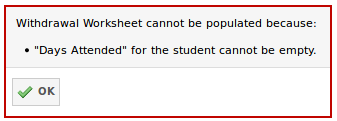
The Days Attended field is also required when populating the withdrawal worksheet:
Available since GEGI v4.8.0 (view release notes).