
TABLE OF CONTENTS
- Creating Origination Records
- Creating Disbursement Records
- Sending Origination and Disbursement Records to COD
- Origination and Disbursement Update After FA Plan Population
- Disbursement Update After SAP Rules Are Met
Creating Origination Records
GEGI can create originations automatically within:
- the defined number of days before/after the student start (for new groups),
- the defined number of days before/after the academic year start (for students who continue).
This requires setting the corresponding values in the settings:
- Period Before Group Start Date for Automatic Originations Creation, days.
- Period After Group Start Date for Automatic Originations Creation, days.
Note: For example, if the Period Before Group Start Date for Automatic Originations Creation, days value is 14 days and the Period After Group Start Date for Automatic Originations Creation, days is 7 days, the originations will start to be created 2 weeks before the group start (academic year) and will stop 1 week after the group start (academic year).
All students that were ENROLLED, ENROLLED Late Start, ACTIVE, or transferred within this period will have the originations created for the Pell and Direct Loan components in the Estimated Payments section of the Financial Aid plan for the corresponding award year.
Note: If a student already has a manually created origination record for the corresponding award year, the automatic record will not be created.
If a student was transferred from another group and the student’s loan period is still valid, some originations made in the previous group may be valid as well. In this case, the student will not be additionally originated in the new group for this period. All the originations for the future periods will be created as per schedule.
The final status of automatically created origination records is defined by the Final Status of Automatically Created O&D Records school setting and can take the following values:
- Not Ready — the system will not try to switch the status of the created origination records to Ready after creation.
- Ready — the system will validate the data of the created origination records and will switch the status to Ready if the validation is successful.
All automatic records will have the Record Source = G (Generated by GEGI) status and can be filtered by the corresponding source on the Originations page.
Creating Disbursement Records
GEGI automatically creates disbursement after the corresponding origination gets the Ready status.
The final status of automatically created disbursement records is defined by the Final Status of Automatically Created O&D Records school setting and can take the following values:
- Not Ready — the system will not try to switch the status of the created disbursement records to Ready after creation.
- Ready — the system will validate the data of the created disbursement records and will switch the status to Ready if the validation is successful.
Enrollment Intensity
GEGI automatically calculates enrollment intensity for Pell disbursement records.
- For Clock Hours and Non-Term Credit Hours programs, the enrollment intensity is always automatically calculated as 100%.
- For Term-Based Credit Hours programs, the enrollment intensity is determined by the ratio of credit hours taken by the student during a given payment period to the full-time credit hours for that period. If the calculated value exceeds 100%, it is considered to be 100%.
Sending Origination and Disbursement Records to COD
By default, the records in the Ready status are sent to COD automatically 14 days before the group start:
- The number of days can be defined by the Number of Days Before Group Start to Send Originations to COD school setting and will be applied to all groups.
- Records are sent daily at 00:00 Pacific Time Zone.
If the date has not come yet (e.g., the FA plan is populated in advance), the records are created and switched to Ready, but not sent to COD.
Note: Records from the previous award years will not be sent to COD if the sending date had passed:
- For Pell, the due date is 10/07 of the later award year (e.g., for 24-25, it will be 10/07/2025).
- For Direct Loans, the deadline is 08/07 of the later award year +1 (e.g., for 24-25, it will be 08/07/2026).
Origination and Disbursement Update After FA Plan Population
GEGI updates origination and disbursement records when populating the Financial Aid Plan. Before populating, GEGI displays a notification listing the records that will be changed:
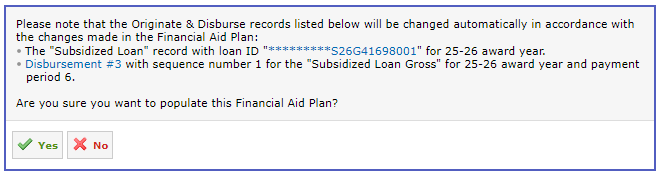
Origination Update
The following origination fields are updated:
- Pell: Enrollment Date, FPS Transaction #, EFC, Verification Status Code, Additional Eligibility Indicator.
- Direct Loan: FPS Transaction #, Loan Period Dates, Dependency, Loan Amount Approved, Direct Loan Attendance Cost, Academic Year Dates, College Grade Level.
If Direct Loans were voided in the Financial Aid Plan, the user is prompted to deactivate the corresponding Direct Loan records. This requires the Inactivate Direct Loan Records permission. Without it, FA Plan population is restricted after voiding Direct Loans.
Disbursement Update
The following disbursement fields are updated:
- Direct Loans: Disbursement Date (recalculated from the current date based on the configured disbursement schedule, e.g., +7 days), Gross, Fee, Net Amount, Payment Period Start Date, Payment Period End Date.
- Pell: Disbursement Date (recalculated from the current date based on the configured disbursement schedule, e.g., +7 days), Amount Submitted, Payment Period Start Date, Payment Period End Date.
When the disbursement’s DRI is set and the record has already been sent to COD (with the Batched, Sent, Accepted, Rejected, Corrected, or Duplicate status), GEGI creates a new disbursement record with the difference between the original and updated amounts. If the award amounts are decreased, GEGI creates a new disbursement record with the same disbursement number and the next sequence number; the amounts and disbursement dates are recalculated, and the record is validated to Ready.
Status After Update
When origination or disbursement records are modified or newly created, the status is set to "Not Ready" and the validation is triggered. Upon successful validation, the status changes to "Ready".
Disbursement Update After SAP Rules Are Met
GEGI can automatically update disbursements after all SAP rules are met from the same payment period.
Once the SAP rules from the payment period are met:
- Disbursement Date is updated: the date shifts forward by the number of business days defined by the Number of Business Days to Disburse After SAP Met school setting. Business days exclude Saturdays, Sundays, and holidays, so the calculated disbursement date never falls on a holiday or a weekend.
- Disbursement Release Indicator is set to "Enabled".
- The disbursement gets the Ready status and is re-sent to COD.
Apart from the SAP rule completion, before DRI is set, the following checks apply for any payment period:
- The disbursement amount is not $0.
- The disbursement amount matches the FA plan.
- The MPN status is "Accepted" (Direct Loans only).
- Student’s stage of the pipeline in a group is ACTIVE or ENROLLED.
- Student's FA status for the same award year is "Cleared."
- The disbursement date does not fall on a holiday or a weekend.
- The student does not have an FA plan draft.
Note: GEGI skips auto-setting the DRI for disbursements with a $0 amount and keeps them in the "Accepted" status.
Note: All SAP Rules are evaluated once a day.