
TABLE OF CONTENTS
- Ordering Link Generation
- Student Communication
- Manual Ordering Link Request
- Program Configuration
- Uniform Order Reminders
GEGI automates the student uniform ordering by generating personalized ordering links and sending them via email. When a student becomes ACTIVE, the system:
- Requests a personalized ordering link from the uniform vendor API.
- Stores the generated link.
- Sends an email to the student with the ordering link.
Ordering Link Generation
The system generates ordering links once per group for every student. Links are not requested if:
- The student transferred from another group where the student already was ACTIVE.
- The student re-enrolled in the same program within 180 days.
Both successful and failed API requests are stored in the system for tracking purposes.
Student Communication
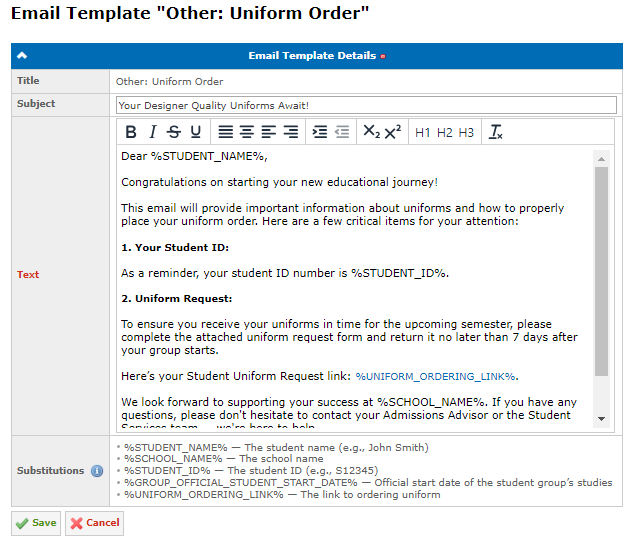
Once the link is successfully generated, students receive an email with their personalized ordering link. The email is generated using the Other: Uniform Order email template (Admin → Email Templates):
Manual Ordering Link Request
GEGI allows requesting ordering links manually for students who need one outside the automatic ACTIVE status trigger. The action is available on the Student: Enrolled Details page for students with the stage of pipeline higher than ENROLLING/ENROLLED in at least one group.
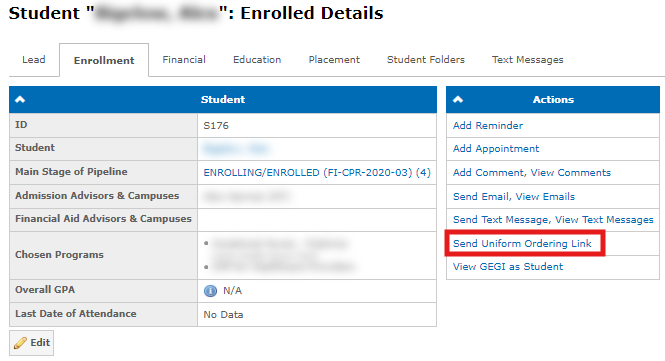
Note: Manual requests override the automatic exclusion rules — a link can be sent even if the student transferred from a group where they were already ACTIVE, or re-enrolled within 180 days. Multiple manual requests can be sent for the same student and group. If a link was already sent manually for a student-group combination, GEGI does not request it again automatically once the student becomes ACTIVE.
Program Configuration
Enable uniform ordering using the Enable Uniform Ordering Link Requests program setting. When enabled, the Number of Days After Start to Request Uniform Ordering Link setting becomes available and controls the delay between a student’s Official Student Start Date and when the link request is sent. A value of "0" requests the link immediately when the student becomes ACTIVE:

Uniform Order Reminders
GEGI sends reminder emails to students who have received an ordering link but have not yet placed their order. Reminders use the Other: Uniform Order Reminder email template.
Reminders are sent only when the following conditions are met:
- Student’s stage in group is ACTIVE.
- Program has the Enable Uniform Ordering Link Requests setting enabled.
- GEGI did not receive an order confirmation from the uniform vendor.
Reminders timing can be configured in School Settings → Days to Send Uniform Order Reminders by listing the number of days counted from when the ordering link has been sent (for example, 3, 5 sends reminders on day 3 and day 5). Leave the field empty to disable automatic reminders:
