GEGI provides Integrated Postsecondary Education Data System (IPEDS) reports to help schools submit the required institutional data to the National Center for Education Statistics (NCES).
To complete the report, run each part for the relevant reporting period and enter the values into the corresponding form in the NCES Data Collection System. Refer to the IPEDS survey materials on the NCES website for field definitions and submission deadlines.
TABLE OF CONTENTS
- Fall Enrollment (EF) Reports
- 12-Month Enrollment (E12) Reports
- Cost I (CST) Report
- Completions (C) Reports
- Graduation Rates (GR) Reports
- IPEDS Ethnicities
Fall Enrollment (EF) Reports
The Fall Enrollment (EF) Report is available via Leads & Students → IPEDS Reports → IPEDS: Fall Enrollment (EF) Report.
The report includes five parts:
- Part A — Enrollment by Race/Ethnicity and Distance Education Status.
- Shows enrollment counts broken down by academic level, attendance status, and gender.
- Includes two tabs: one for race/ethnicity (using the "IPEDS Ethnicities" list) and one for distance education status.
- Part B — Enrollment by Age.
- Shows enrollment counts across 11 IPEDS standard age categories, broken down by academic level and attendance status.
- Part C — First-Time Undergraduates: Residence and HS Graduation Within 12 Months.
- Applies to first-time, degree-seeking undergraduate students only.
- Shows enrollment counts by state or country, split by whether the student graduated high school within the 12 months before the start of the program.
- Part D — Total Entering Undergraduate Class.
- Shows undergraduate enrollment counts by entry classification and attendance status.
- The grand total matches the Part A undergraduate total.
- Part E — Student Retention Rates.
- Shows enrollment and completion outcomes for students from the prior year’s cohort.
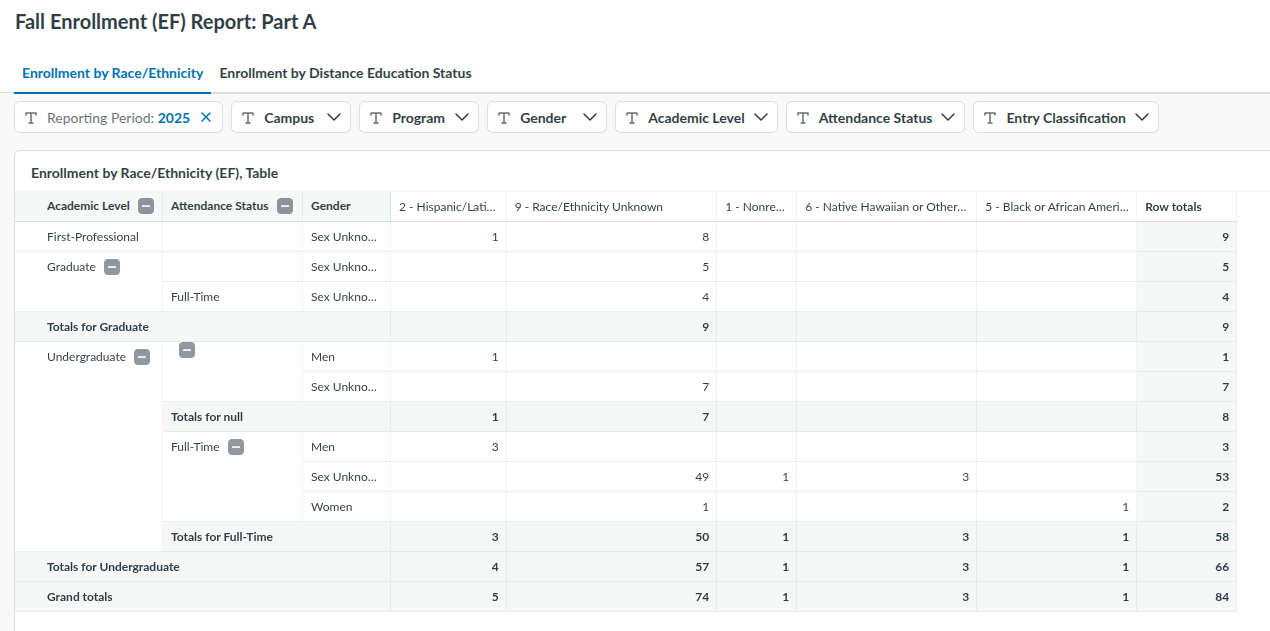
Note: All parts follow the same layout. Use the Reporting Period filter to select the correct fall enrollment period before exporting values.
12-Month Enrollment (E12) Reports
The IPEDS 12-Month Enrollment (E12) Report is available at Leads & Students → IPEDS Reports → IPEDS: 12-Month Enrollment (E12) Report.
The reports in GEGI include:
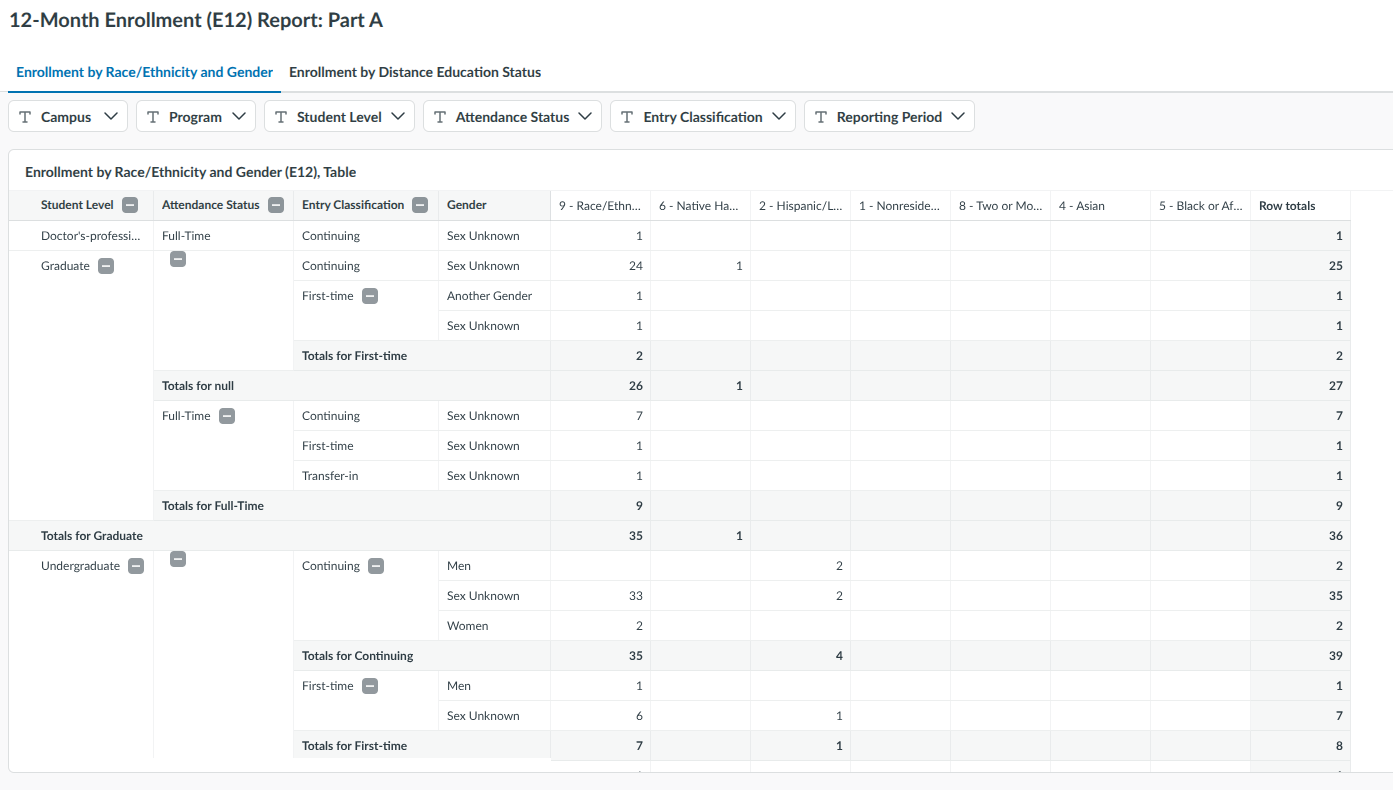
- Part A — Enrollment by Race/Ethnicity, Gender, and Distance Education Status.
- Shows enrollment counts by race/ethnicity and gender across the academic level, attendance status, and entry classification; and by distance education status across the academic level, attendance status, and gender.
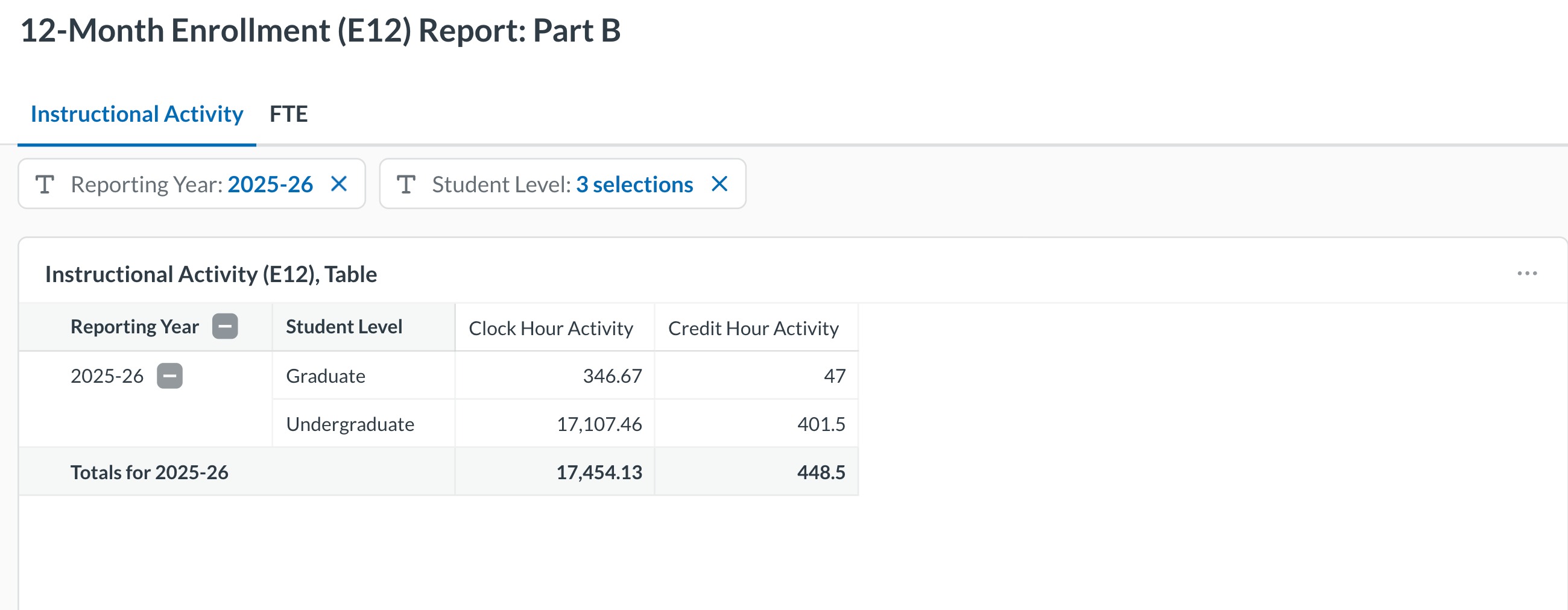
- Part B — Instructional Activity and FTE.
- Shows instructional activity (clock hour and credit hour) across the reporting year and student level; and full-time equivalent (FTE) enrollment — undergraduate, graduate, and total — across the reporting year.
Cost I (CST) Report
The IPEDS Cost I (CST) Report is available at Leads & Students → IPEDS Reports → IPEDS: Cost I (CST) Cost I → (CST): Part C.
The report includes one part:
- Part C — Program Data.
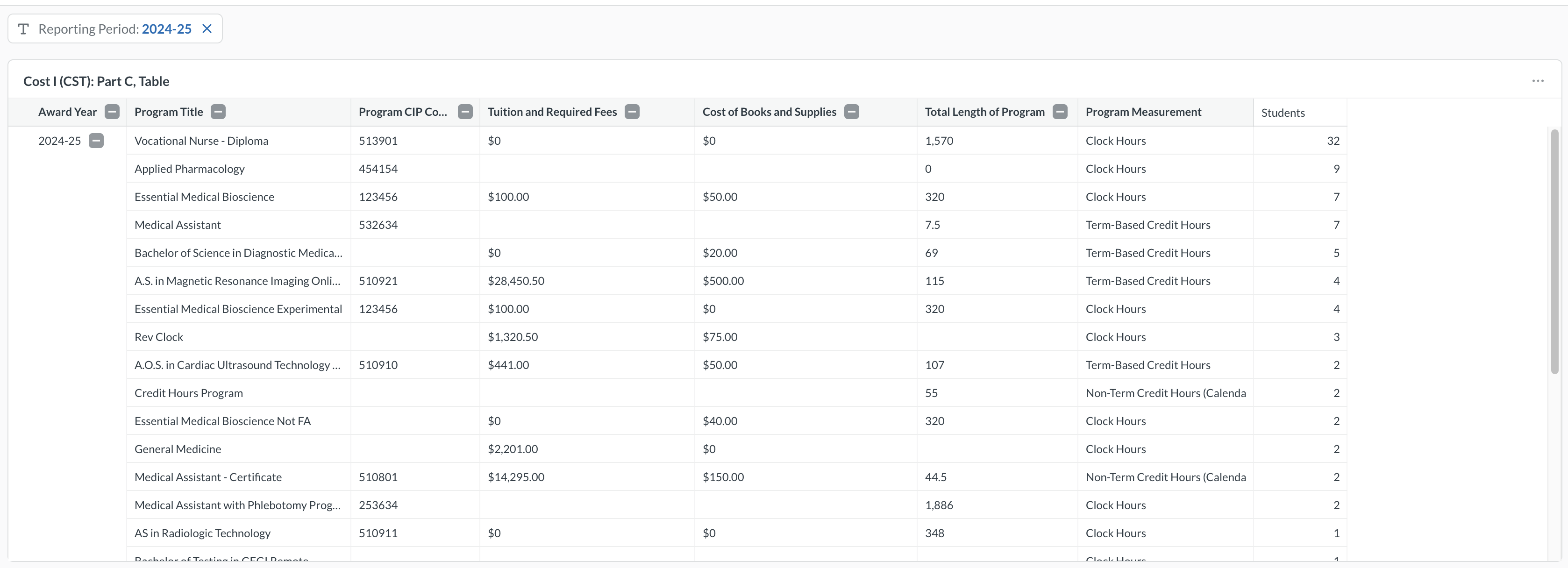
- Shows program-level cost data for each program, ranked by the number of students who became active during the reporting period: award year, program title, CIP code, tuition and required fees, cost of books and supplies, total length of program, program measurement, and number of students.
Completions (C) Reports
The IPEDS Completions (C) reports are available at Leads & Students → IPEDS Reports → IPEDS: Completions (C). The reports are organized into All Completers, Completers by Level and CIP Data.
All Completers
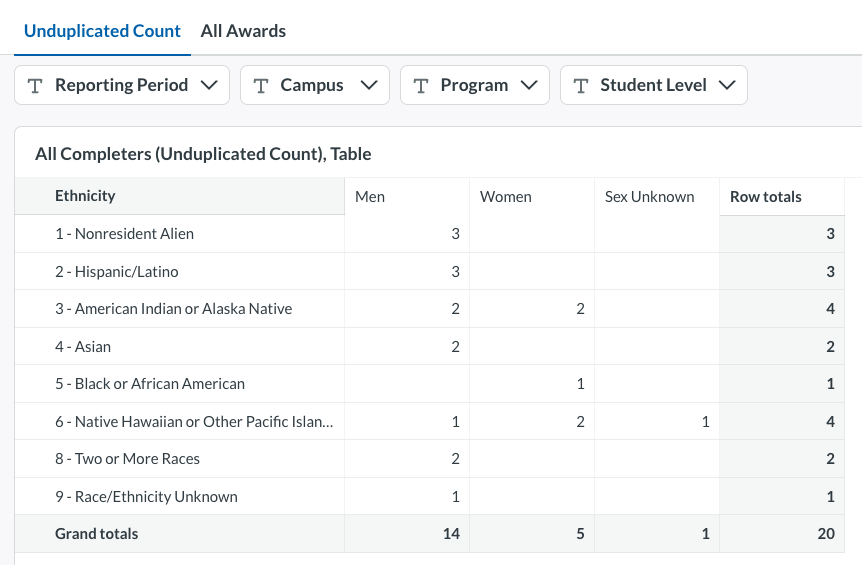
All Completers report is available at Leads & Students → IPEDS Reports → IPEDS: Completions (C) → Completions (C): All Completers. It contains two tables that report completers by sex and race/ethnicity:
- Unduplicated Count — a distinct count of students who became GRADUATED within the award year.
- All Awards — a count of all cases when a student became GRADUATED, including students who earned more than one award.
Completers by Level
The Completers by Level reports break completers down by award level. It contains three reports, each on its own tab:
- Completers by Level and Gender — rows: Male, Female, Total.
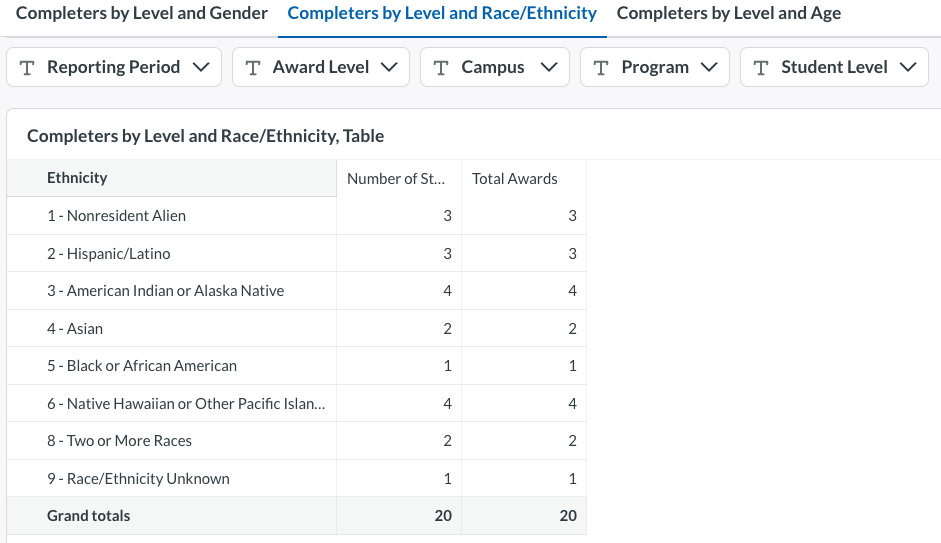
- Completers by Level and Race/Ethnicity — rows correspond to the "IPEDS Ethnicities" list.
- Completers by Level and Age — rows: Under 18, 18–24, 25–39, 40 and above, Age unknown, Total. Student age is calculated at the time the award was conferred.
Each report shows two columns:
- Number of Students — an unduplicated count per award level. A student who graduates twice within the same award level is counted once.
- Total Awards — a raw count of awards conferred at that level, including multiple awards for the same student.
CIP Data
CIP Data report counts awards conferred to students who became GRADUATED within the reporting period (July 1 – June 30). Each conferred award is counted, so a student who earns two credentials is counted twice.
Graduation Rates (GR) Reports
The IPEDS Graduation Rates (GR) reports are available at Leads & Students → IPEDS Reports → IPEDS: Graduation Rates (GR) Report.
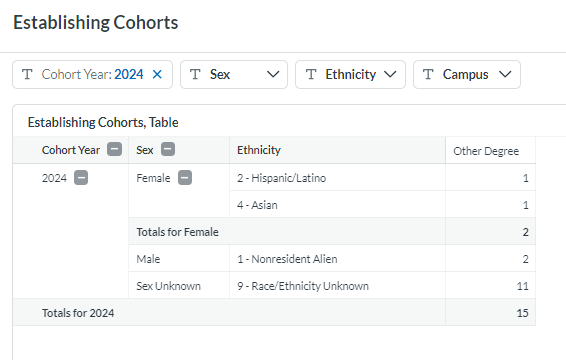
Establishing Cohorts
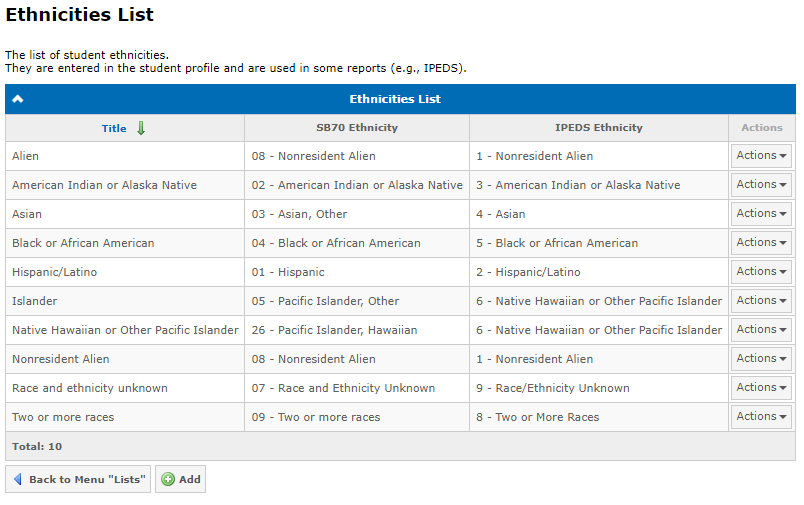
IPEDS Ethnicities
Configure the IPEDS Ethnicity mapping in Admin → Lists → Ethnicities List to match institutional ethnicity categories to the IPEDS-required values: