
TABLE OF CONTENTS
The Nevada Commission on Postsecondary Education (CPE) requires licensed schools to submit an annual report with the enrollment data for each program. GEGI allows collecting this data automatically for the Nevada Annual Report. The data is compliant with the Nevada CPE requirements.
Nevada Annual: Enrollment
This report provides the enrollment information for each Nevada-licensed program for the reporting year (calendar year, January 1 – December 31). The report is generated in the GEGI Reporting System (Dashboards → Reporting System → Nevada Annual: Enrollment):
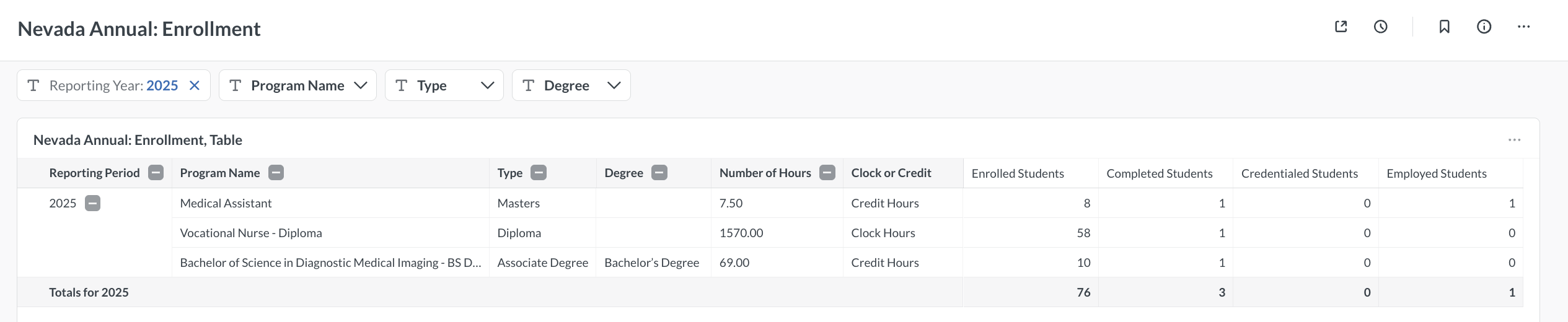
The report has the following fields:
- Reporting Period — the calendar year of the reporting period.
- Program Name — the value from the Name for Documents field in program settings.
- Type — the program type configured in the Nevada Reports section of program settings (Pre-License, Diploma, Associate Degree, Bachelor Degree, Masters, Doctorate, Juris Doctorate, or Post Graduate Certificate).
- Degree — the degree type for degree programs. Degree programs are: Associates (AS, AOS), Bachelors (BS), and Masters (MS). Certificates and Diplomas are not degree programs and have no value in this column.
- Number of Hours — total program clock hours or credit hours.
- Clock or Credit — indicates whether the program uses clock hours or credit hours.
- Enrolled Students — students who were active for at least one day during the reporting period.
- Completed Students — students who successfully graduated during the reporting period.
- Credentialed Students — students who obtained a national or state credential upon program completion (a License Number is specified in their Placement Record).
- Employed Students — graduates who gained employment during the reporting period.
Note: Programs with no students are not displayed in the report.
Setting Up Programs for the Report
For a program to appear in the Nevada Annual: Enrollment report, it must be configured in the program settings (Admin → Programs). In the Nevada Reports section on the program details page:

- Check the Include in Nevada Reports checkbox to mark the program as Nevada-licensed.
- Select the appropriate Program Type for Nevada Reports from the dropdown (Pre-License, Diploma, Associate Degree, Bachelor Degree, Masters, Doctorate, Juris Doctorate, Post Graduate Certificate).
You can also see which programs are included in Nevada Reports directly on the Admin → Programs page, where the Include in Nevada Reports field is displayed as a column.