
TABLE OF CONTENTS
The stage of the pipeline is the student’s stage in the system which reflects the actual state of the student’s progress in the educational institution.
There are two types of the stage of the pipeline:
- Stage of Pipeline in Group — student’s stage in a particular group.
- Main Stage of Pipeline — overall student’s stage.
If a student is added to groups, the main stage is defined based on the stages in all student’s groups, and priority is given to the REGISTERED stage and the succeeding stages.
Please, see below the overall description for each of the stages of the pipeline for both types:
Stages of Pipeline in Group
| Stage | Description |
| PENDING | The lead is unsure about the enrollment. Set by default when adding a student to a group. The students registration is pending. |
| NOT INTERESTED | The lead is not interested in a program (the lead explicitly stated it before the Enrollment Agreement was signed). |
| NOT QUALIFIED | Lead is not qualified for this program yet (possible cases: no high school diploma yet, not 18 yet, not meeting other requirements to qualify to enroll) |
| REGISTERING/REGISTERED | REGISTERING — the lead is at the stage of registering in the school (the Registration Form is not completed, or completed but not populated). Becomes REGISTERED after the Registration Form is populated. |
| ENROLLING/ENROLLED | The stage is switched to ENROLLING manually when adding a student to a group. Becomes ENROLLED: if switched manually; after the EA is populated; after the EA is signed using e-sign; after the signed EA is uploaded to the Student Folder (according to the setting in the Academy Settings). |
| ENROLLED Late start | The student will start the classes later than the official start date. (e.g. Credit Grant, LOA, etc) |
| NOT STARTED | The student was enrolled but never attended the classes (e.g. canceled Enrollment Agreement prior to attending the class, the group was canceled, or any other reason.) |
| ACTIVE Pending | The student has not yet attended scheduled classes that already started. |
| ACTIVE | The student is currently attending classes. |
| ACTIVE Remediation | The student is currently attending classes and is on remediation. |
| ACTIVE Disciplinary Probation | The student is currently attending classes and is on disciplinary probation. |
| ACTIVE Academic Probation | The student is currently attending classes and is on academic probation. |
| ACTIVE Warning | The student is currently attending classes and received a warning (either academic or disciplinary). |
| LOA Pending | The student requested to be placed on LOA (Leave of Absence) and is waiting for a response from an institute. |
| LOA | The student is placed on LOA. LOA was approved. |
| LOA Dropped | The student was on LOA — the student did not return on ERD (Expected Return Date). The student was dropped from the program. |
| LOA Transferring | The student was on LOA and is returning. The student will resume the study in a new cohort. |
| TRANSFERRED | The student is transferred from this group to another group. |
| DROPPED Pending | The student’s withdrawal/expulsion is not yet finalized. |
| DROPPED | The student stopped attending (withdrawn/expelled). Dropped was approved. |
| DROPPED with Comment = Completed NP | The student has finished studying without passing the exams. |
| DROPPED Transferred | The student stopped attending (withdrawn/expelled) and re-enrolled within 6 months. |
| COMPLETED | The student has completed all assigned courses/hours and has met all requirements for completion. |
| GRADUATED | The student has met all requirements for graduation and graduated from the program. Only for Core groups. The final Prereq group status is COMPLETED. |
Reasons for NOT STARTED
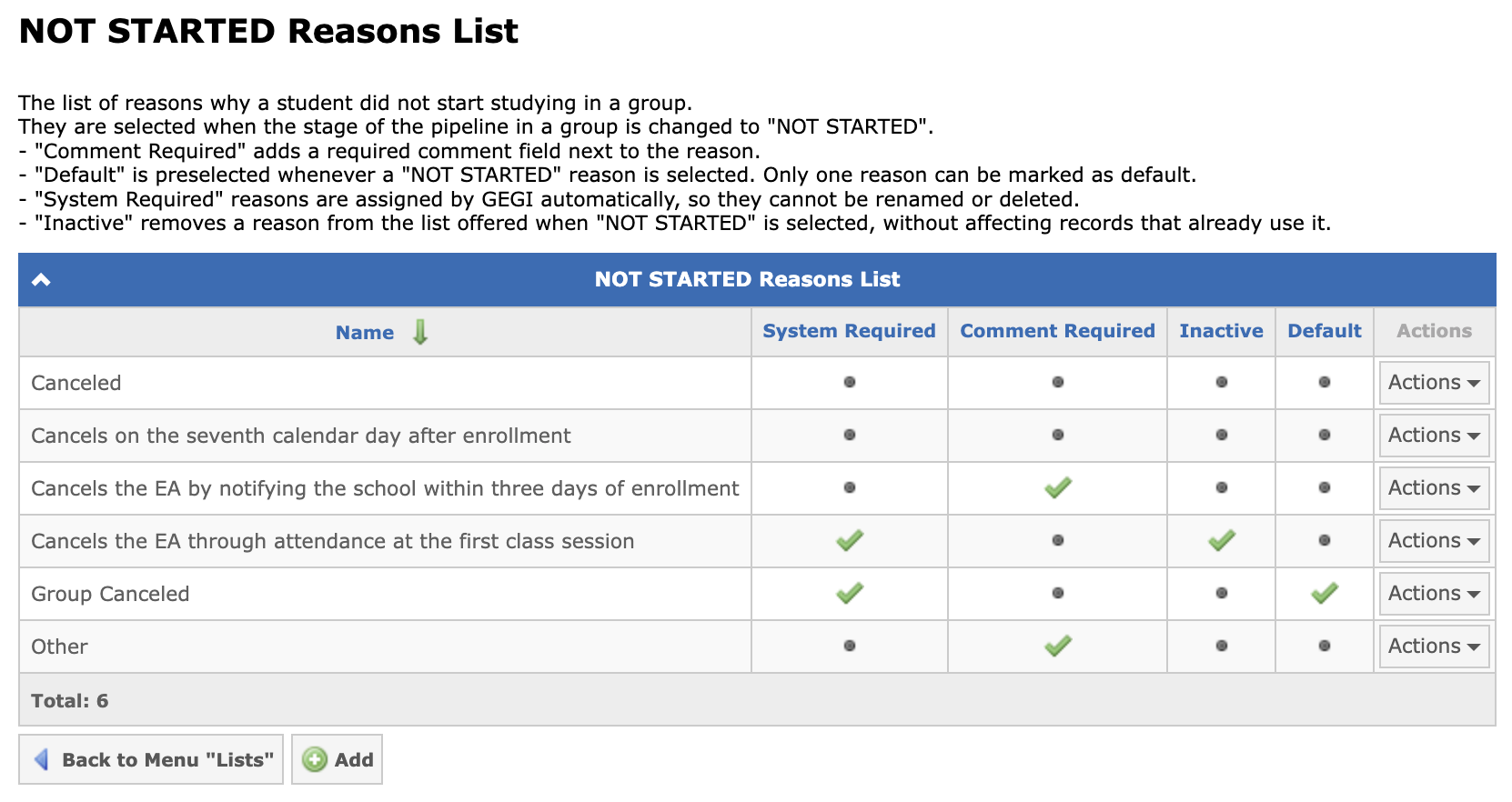
The reasons available for the NOT STARTED stage are managed in a configurable list at Admin → Lists → Not Started Reasons. Each reason can be marked as requiring a comment, inactive, or default (the default reason is preselected when a student’s stage is changed to NOT STARTED). Reasons marked as system required — assigned automatically by the system — cannot be renamed or deleted.
Main Stages of Pipeline
| Stage | Description |
| LEAD | Any individual who is interested in attending or requested info about a program, and was added to the system. |
| CONTACT | Contact was made with the lead via phone/email/face-to-face during an open house or another event. The stage is switched automatically or manually by users if the student is in the LEAD status and the Appointment is being assigned for the student. |
| PROSPECT | The individual met with the admission advisor for an initial meeting and will potentially enroll. Switched manually. |
| DISQUALIFIED | An individual who provided wrong contact information, or was dropped from a program, and should not be re-enrolled because of illegal activity, cheating, or criminal activity. |
Other main stages of the pipeline are the same as the stages of the pipeline in a group.
Note: More information about the automatic switching of the stages of the pipeline in a group can be found in the following article: Automatic Switching of the Stages of Pipeline in Group.