
Locations:
- Top right corner of any page
Users with the following permissions:
- Users with access to multiple campuses
Case:
Need an easily accessible and intuitive switch between multiple campuses.
Problem:
How to switch between campuses quickly?
Solution:
Top right corner of any page allows a quick switch between campuses or All My Campuses mode to see all records from all campuses. This is permission based feature. See example below:
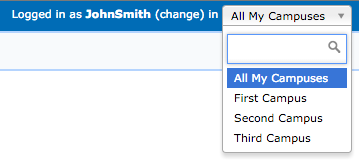
Note: All My Campuses mode is selected by default when user logging back into GEGI.
Available since GEGI v4.4.0 (view release notes)