Locations:
- Leads & Students page
- Financial Module: Students page
- Education Module: Students page
- Placement Module: Students page
Users with the following permissions:
- Bulk Email: Send Bulk Email
Case:
There is no transparency when sending a bulk email. Example: some selected students are missing from the list in the first step and there are no explanations why each student is missing from the bulk selected.
Problem:
How to show the missing students (and the reason why) from the bulk list selected?
Solution:
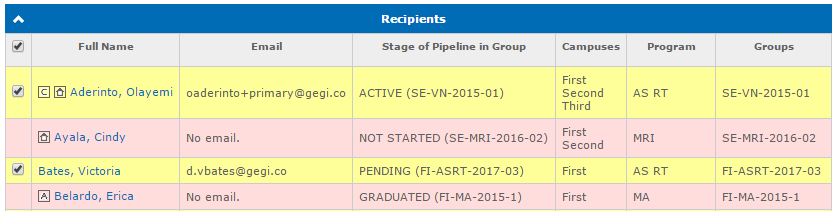
When sending a bulk email all selected students are shown in the Recipients panel on the Send Bulk Email page.
If the student can not receive an email for any reason, the row with the student is highlighted in red and the reason is displayed in the Email field: